A desktop workspace for thinking and building with AI
What you build with AI deserves more than a quick chat.
The best thinking you do with an AI vanishes into a scroll of throwaway conversations — unsourced, unstructured, impossible to build on. Minerva is where that work lands and stays: knowledge you can check, connect, and keep. You and the AI build it together — with you fully in control.
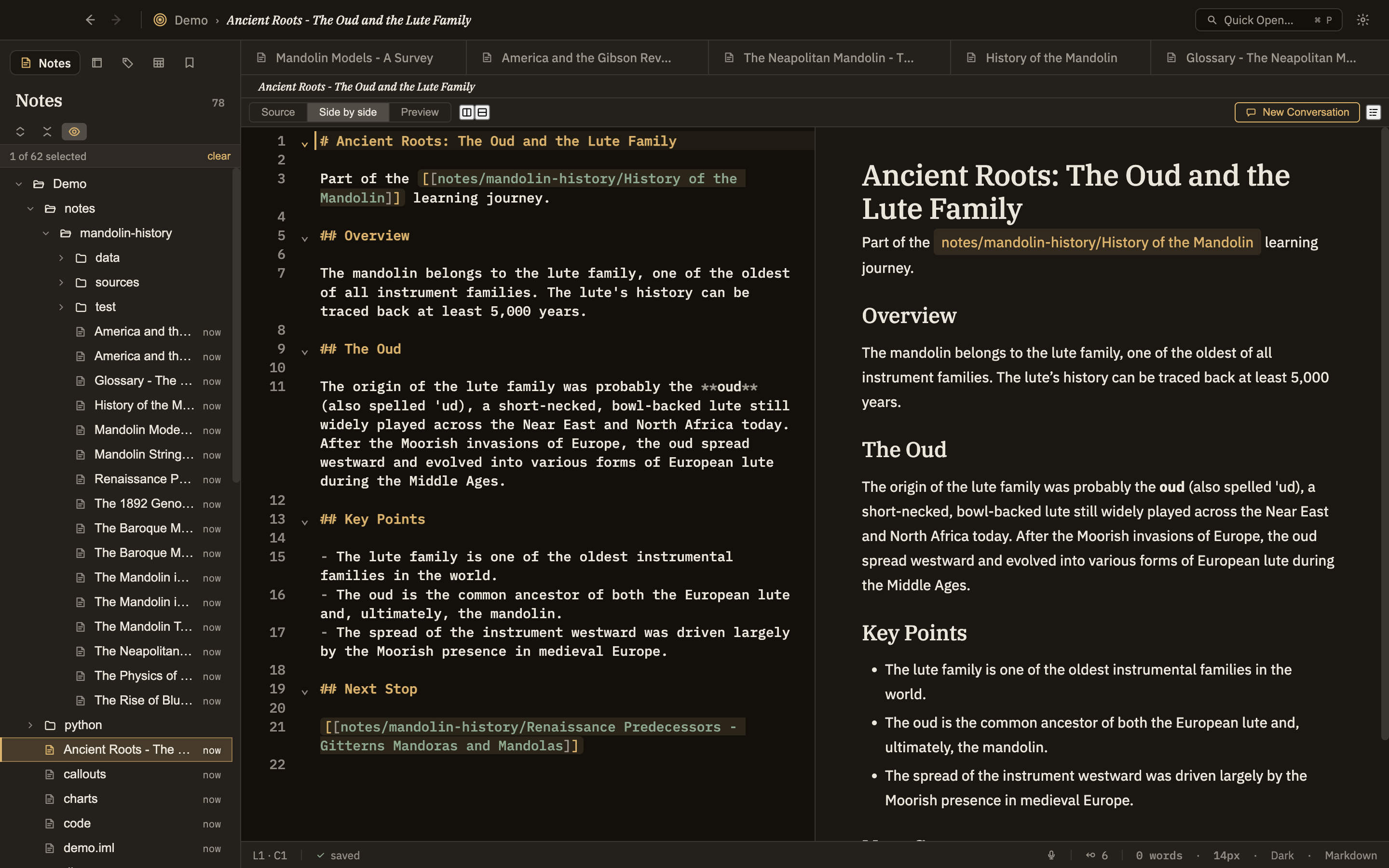
A Minerva thoughtbase is where your thinking on a subject lives and grows. Instead of scattered documents and lost chat threads, you collect what you're working through as notes — and those notes link to each other, so ideas connect the way they do in your head. Some you write yourself; some you draft side by side with the AI. Over time it becomes a living map of what you know, not a folder of dead files.
🧵
Notes of every kind
A note can be a stray paragraph, a full essay, a table of data, a diagram, an image, a math derivation, or a captured web page. Whatever the thought needs.
🔗
Linked, not filed
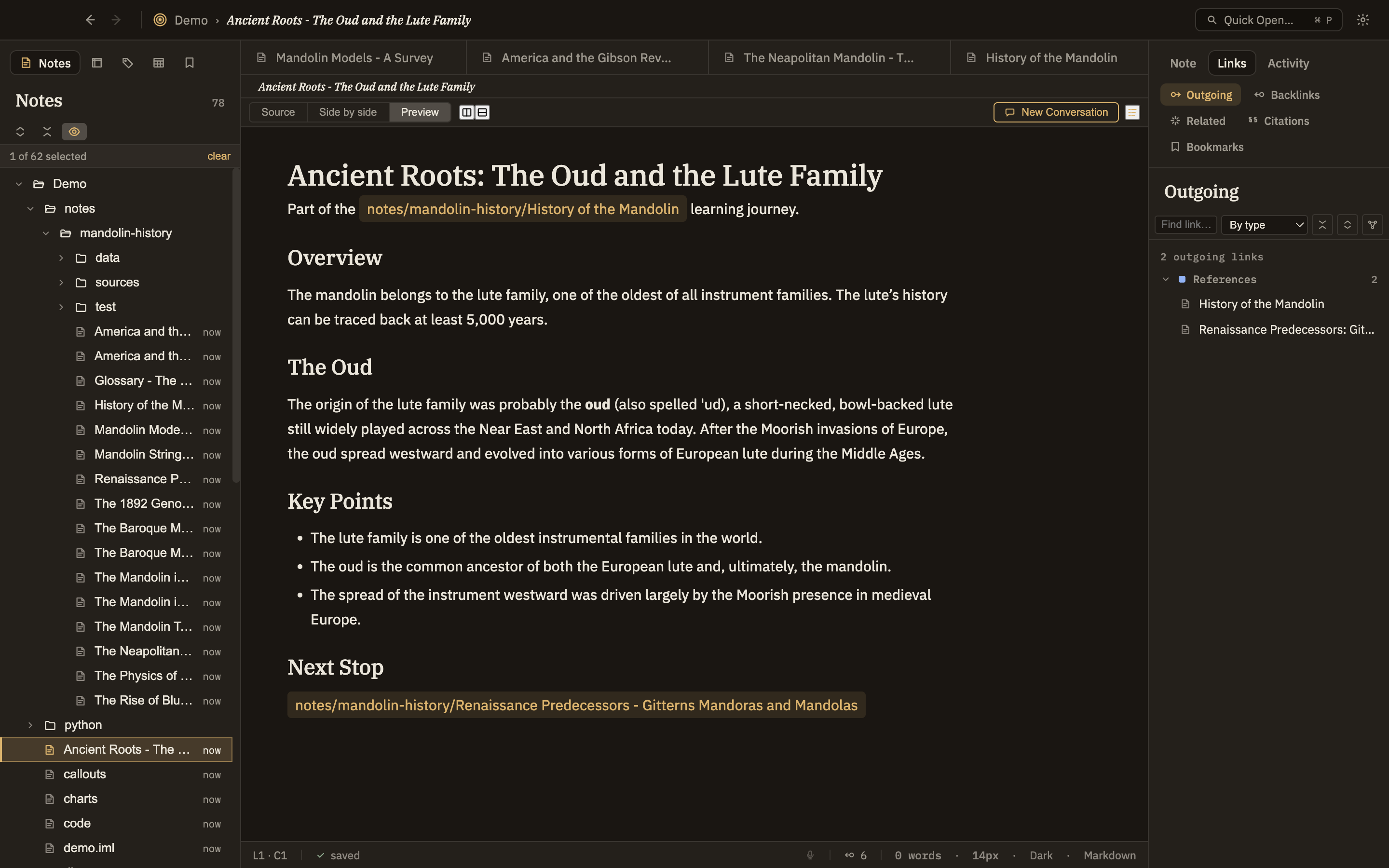
Connect any note to any other with a link — cite it, support it, contradict it, build on it. Follow the threads instead of hunting through folders.
🤝
Yours and the AI's, together
Write by hand when you want to, or let the AI draft, summarize, and gather — with you approving what actually lands. Either way, it's yours to keep.
A thoughtbase
Object Types
Some notes are things
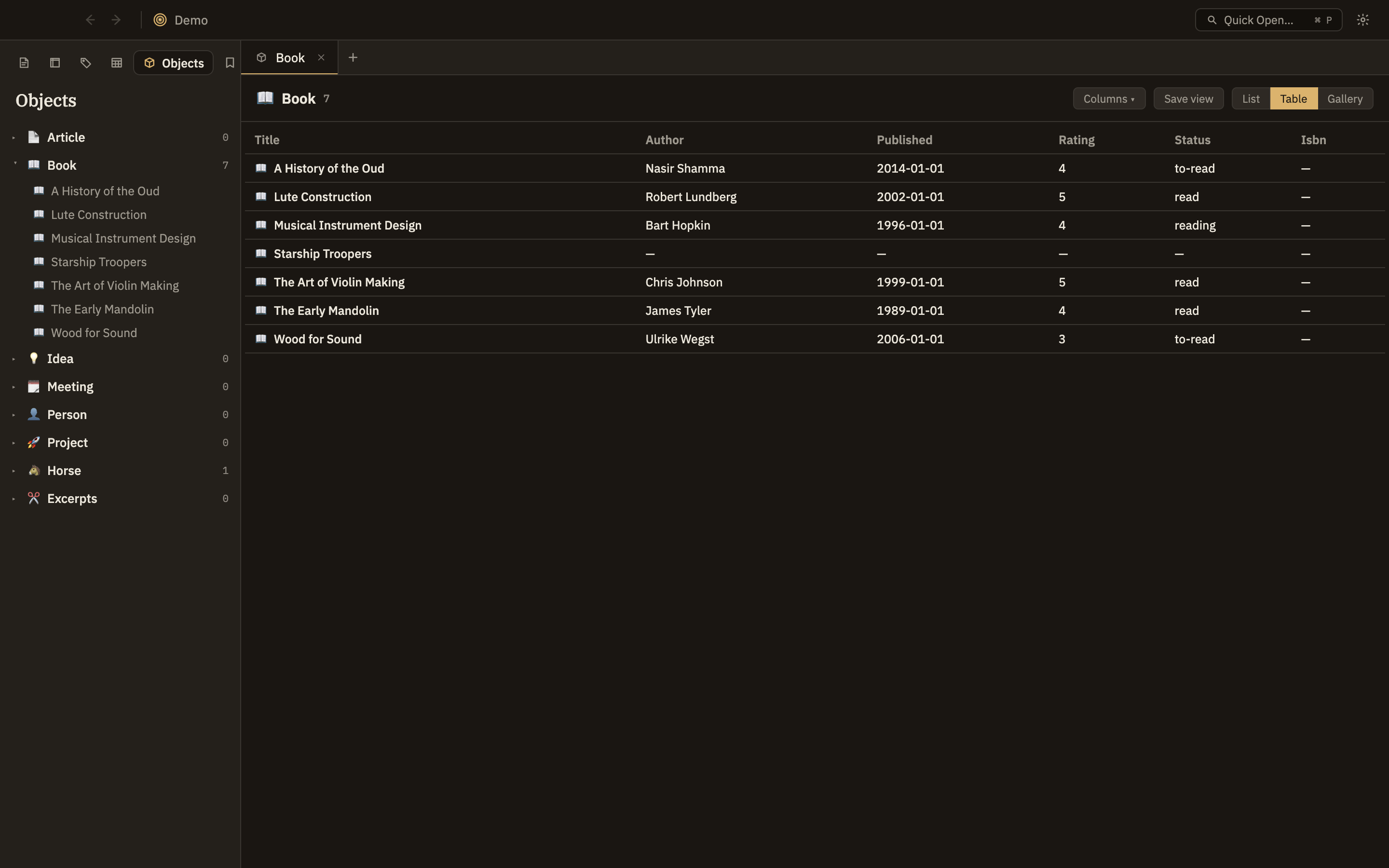
Most of what you write is prose. But some notes are a kind of thing — a book you're reading, a person you keep citing, a meeting that produced three decisions. Tell Minerva what a note is and it grows the fields that kind of thing should have: a Book gets an author, a published date, a rating, a reading status. The prose stays exactly where it was. You just stop retyping the same six headings and hoping you spelled the author's name the same way as last time.
📖
Six types, ready to use
Book, Person, Meeting, Project, Idea, Article — there from the first launch. Bend them to fit: add a field to Book and it's your Book from then on, in this thoughtbase, without forking anything or losing the updates.
🧾
Fields, not formatting
A typed note's fields show up as a small form beside it — including the ones you haven't filled in, which is how you notice they're empty. The type's icon then follows the note everywhere: the tree, tabs, quick switch, backlinks.
🗂️
Browse by kind
The Objects panel lists your thoughtbase by what things are rather than which folder they landed in. Open a type as a list, a table, or a gallery — the columns are its fields — and save the views you keep coming back to.
🔎
Structure the graph can see
Types are part of the knowledge graph, so they're answerable: every Book published before 1970, every Person cited in two projects. A question you couldn't ask a pile of prose.
✍️
Make your own
Nothing about the six is special. Add a type for whatever you actually track — Instrument, Experiment, Horse — pick its icon and colour, and declare the fields it should carry.
🎒
They travel with the work
Types live in the thoughtbase, not in the app's settings on one machine. Copy the thoughtbase, hand it to someone, open it on a different computer — the types come too.
Your thoughtbase by kind, not by folder
The Editor
An editor that keeps up with your thinking
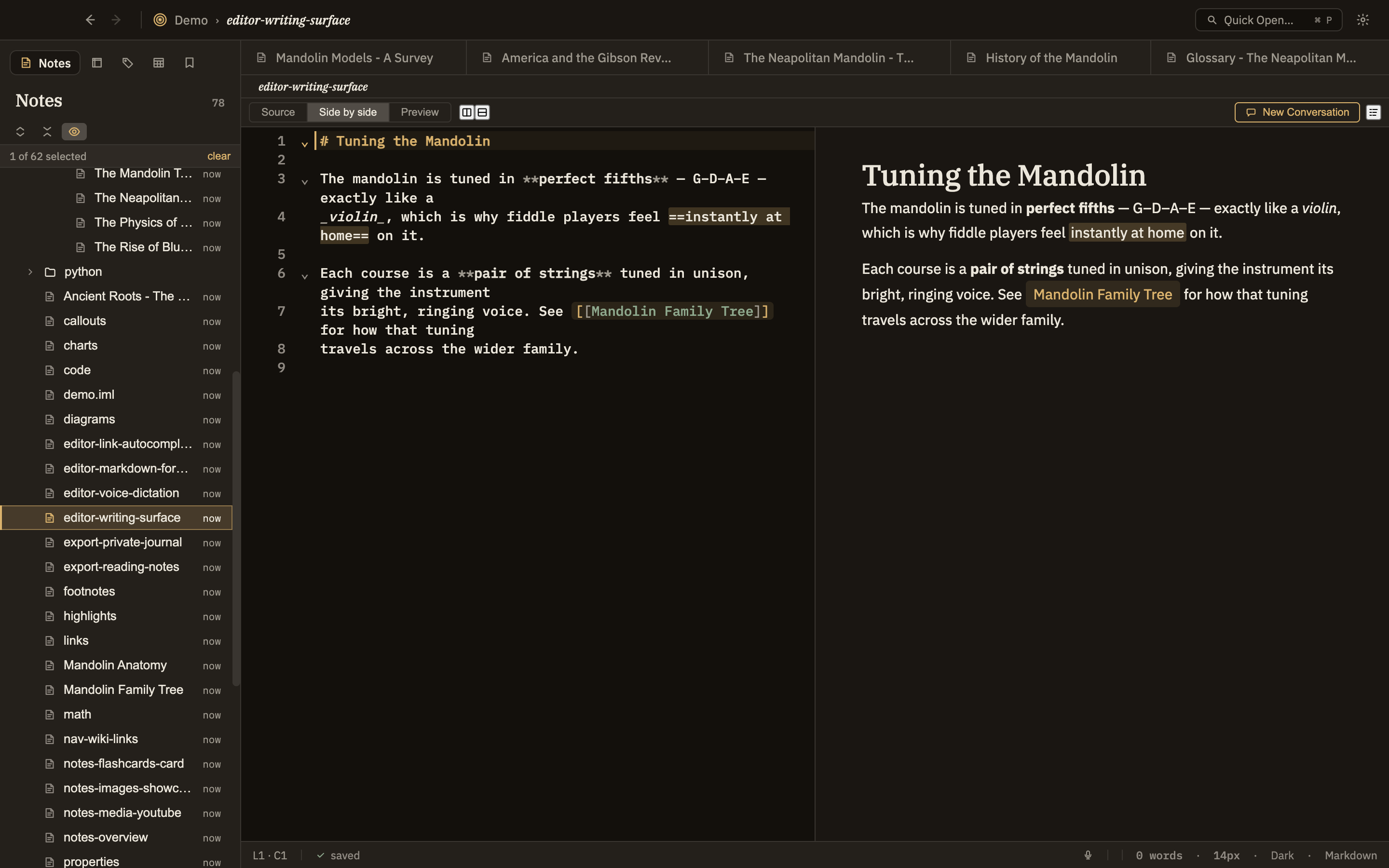
A fast CodeMirror 6 surface with live preview. Write plain markdown; get rendered callouts, math, diagrams, charts, and code without leaving the keyboard.
Three view modes— source, preview, or split, toggled instantly.
Wiki-links & typed links— [[note]] plus 11 semantic link types (supports, rebuts, depends-on, supersedes…) each color-coded.
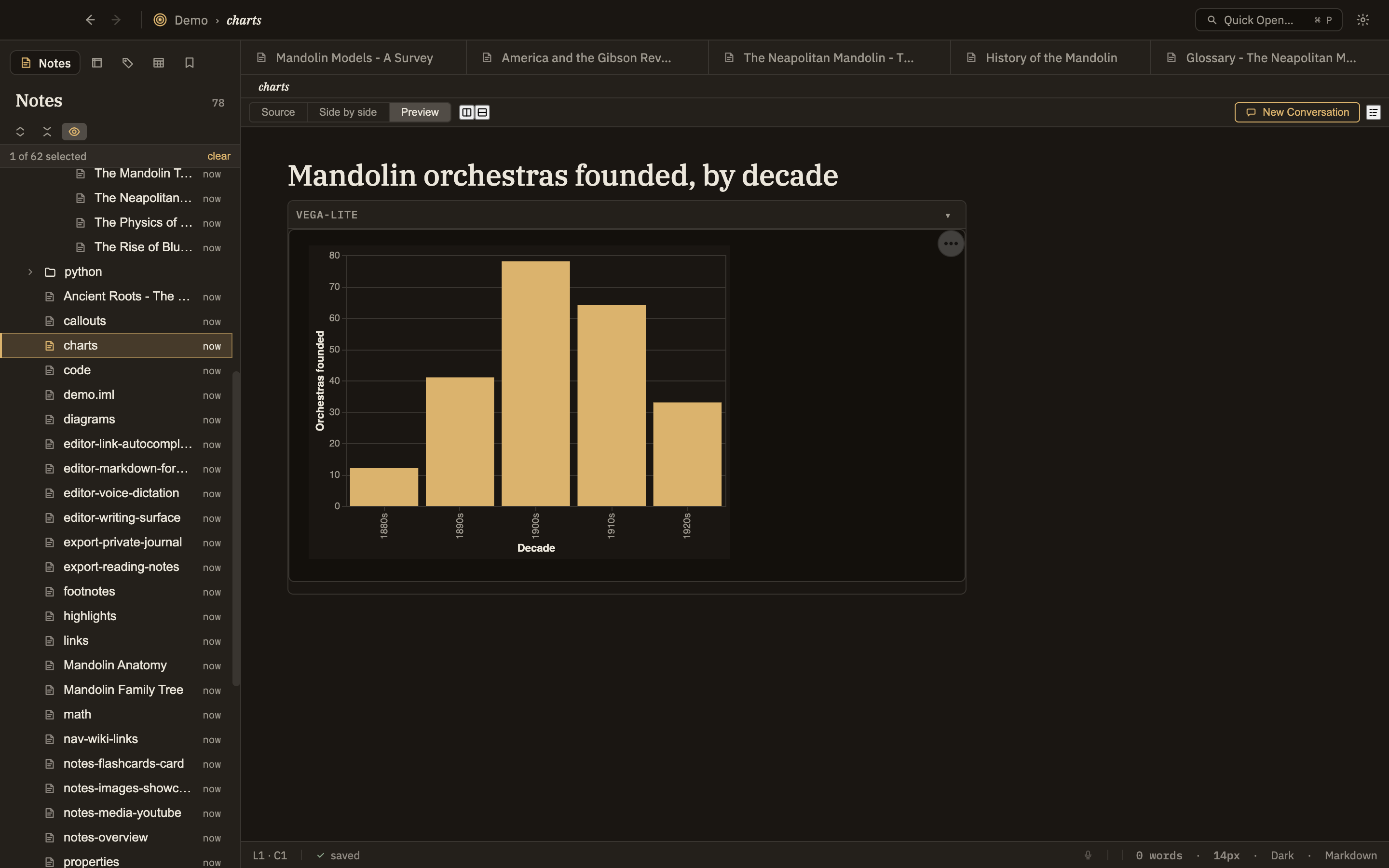
Code sections that run— Python, SQL, SPARQL, and Vega/Vega-Lite charts render live against your data, enabling powerful data visualizations.
Voice dictation— Native speech-to-text, take your notes by voice with AI-powered expansion.
Editor / split view
The Knowledge Graph
A knowledge graph your AI can actually read
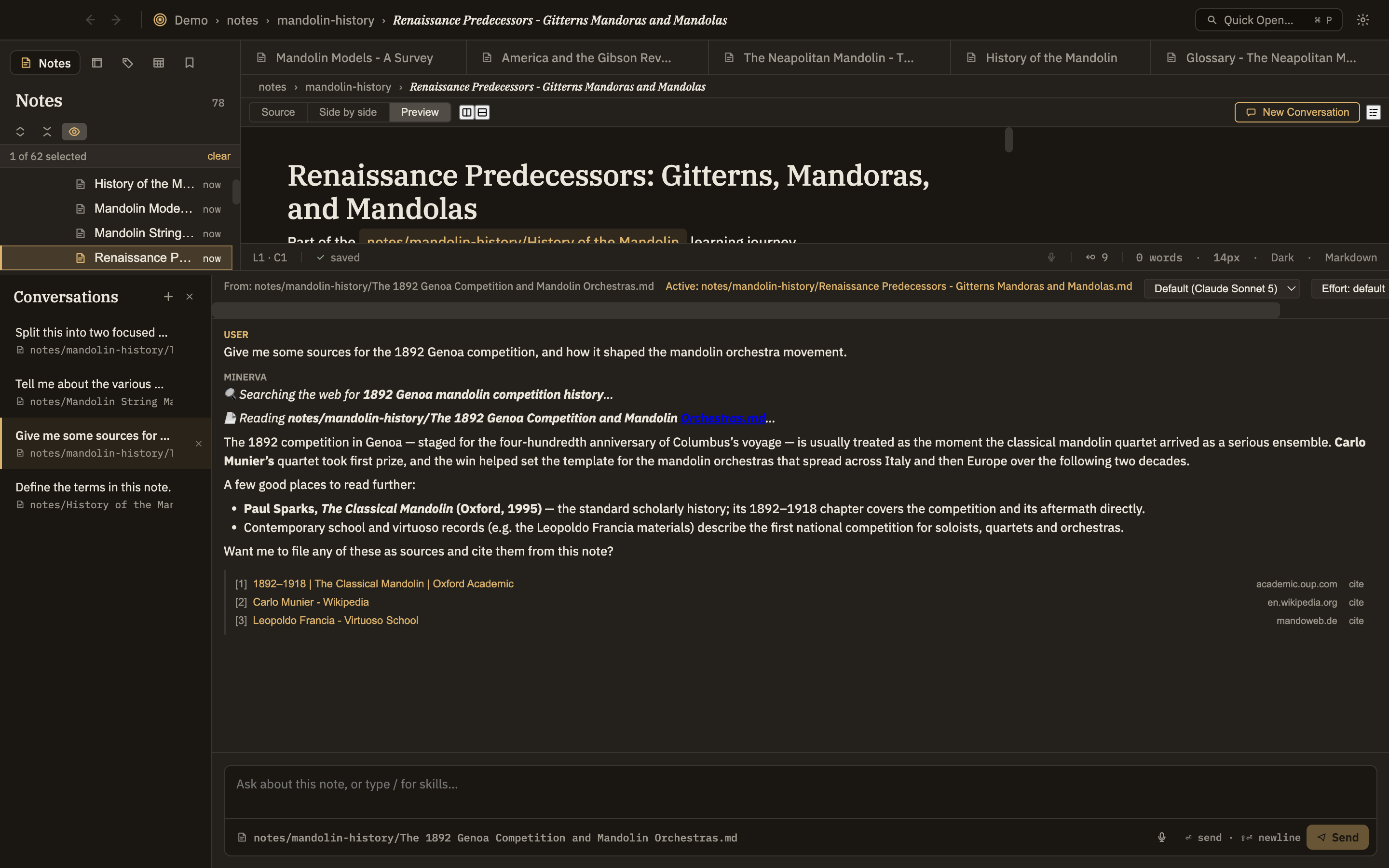
On every change, Minerva reads the structure out of your writing — titles, tags, links, metadata, even data tables — and weaves it into a knowledge graph: a precise map of everything you've written and how it connects. That map is what lets the AI search for your real notes instead of guessing, and use them with context and understanding.
Grounded, not guessed— the AI queries your knowledge graph to answer from what you actually wrote, and points back to the exact notes it drew on.
Insights surfaced for you— ask it to trace how a claim is supported, find where your notes contradict each other, or spot patterns across hundreds of them.
Built automatically— titles, #tags, wiki-links, metadata, and data tables all fold in on save. No schema wrangling.
Query it yourself, too— a built-in query panel is right there when you want to interrogate everything directly. Industry-standard SQL and SPARQL query languages supported.
AI answering from the graph
Data & Analysis
Bring data into your thinking
Drop a CSV into your thoughtbase and it becomes a queryable table. Query it with SQL, run Python right in your notes, chart the result, and let Minerva help you find what's interesting.
🐍
Python cells
A python code fence turns any note into a notebook. A minerva.* library API — notes(), sparql(), sql(), table() — hands you your own library as data; output renders inline.
🗃️
CSV → SQL tables
Any .csv becomes a DuckDB table with inferred types. Run SELECT/WITH queries and bind results straight into charts.
🧮
The library is the data source
Notebooks live inside the thoughtbase, not the other way around. Derived outputs save as notes with a derivedFrom link back to the computation.
📈
Generate Visualizations
Point Minerva at a table and it proposes the right charts for the shape of your data — as a note you review.
🔎
Find Outliers
Flag anomalous values in tabular data, with the reasoning written up as a reviewable note.
🔗
Find Correlations
Surface the strongest relationships across your data before you go looking for them by hand.
Data analysis
Tools for Thought
Skills — thinking moves, one click away
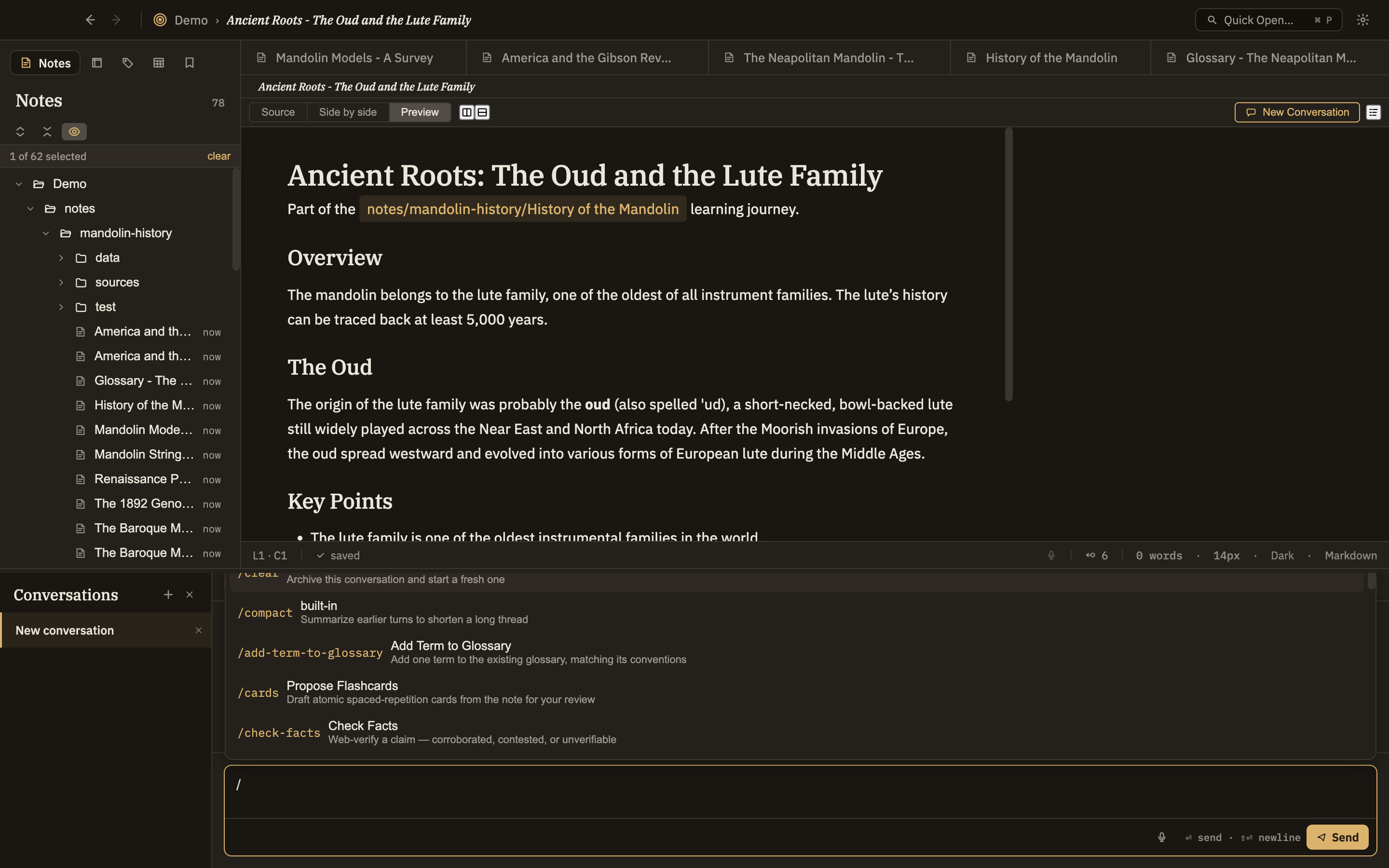
Minerva ships with a library of skills: structured thinking operations you invoke from the Learning, Research, and Analysis menus. Each runs a careful prompt over your note and returns something you review. Author your own in a markdown file; they show up in the menus alongside the built-ins.
📚 Learning / understand it
Explain Like I'm…Re-explain at any level
Define TermsExtract & define the jargon
Find PrerequisitesWhat to learn first
Give ExamplesConcrete illustrations
Quiz MeGraded comprehension check
Propose FlashcardsAtomic Q/A for spaced repetition
Create Learning JourneyAn ordered path to mastery
🔬 Research / verify it
Check FactsWeb-verify a claim
Find Primary SourcesPast the citation chain
Find SourcesBuild a reading list
Extract Key ClaimsEach with a supporting excerpt
Decompose into ClaimsOne typed claim per assertion
Find Opposing / Supporting ArgumentsThe strongest case either way
Translate the MagnitudeRe-ground a number against base rates
🧠 Analysis / pressure-test it
Steelman & AntithesizeStrongest counter-case
Double CruxFind the crux of a disagreement
ExcavateSurface hidden assumptions
MurphyjitsuPre-mortem a plan's failure
DimensionalizeReduce a decision to measurable axes
Reference ClassForecast from the outside view
Synthesize, Negspace, Taboo, Metaphorize…and many more
Nearly 50 skills in all — and the set is yours to extend and organize.
Skills menu
You Decide
The AI proposes. You confirm.
"The AI suggests; you decide. What it produces is evidence for you to weigh and file — never a change to what you know until you say so."
— Minerva's core design principle
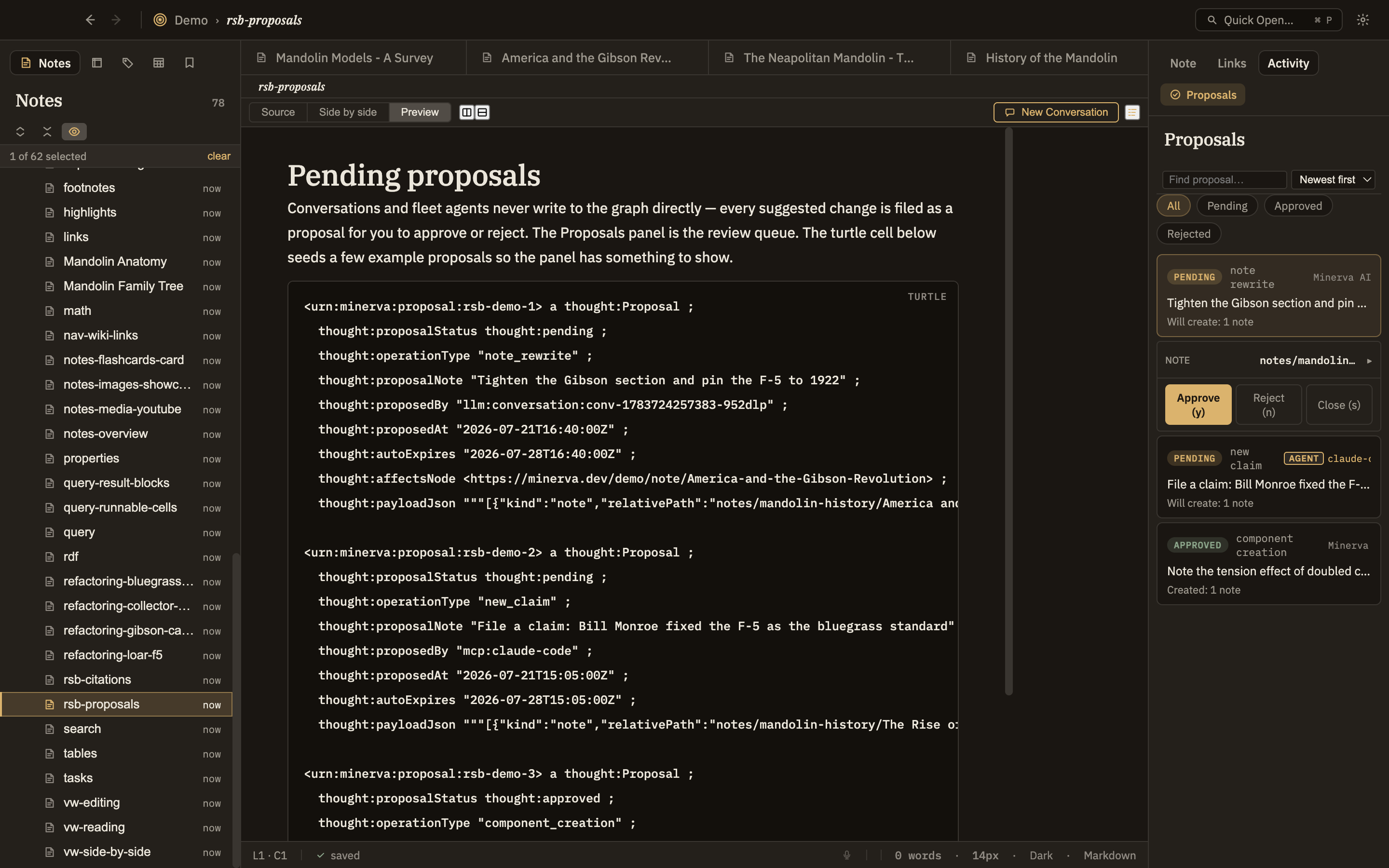
Nothing an AI generates touches your thoughtbase directly. Every suggested claim, edit, tag, or source arrives as a proposal you review side by side and accept with a single keystroke — or reject. Approved changes are written into your notes; ignored ones simply expire.
Review before it counts— see exactly what would change, side by side, before it does.
You set the line— new claims require your sign-off; trivial tags can apply quietly. Tune what needs approval.
Full provenance— everything the AI touches records what proposed it and when.
Guaranteed, not promised— a built-in integrity check can prove nothing the AI created ever skipped your approval.
Proposal review
Structured Reasoning
A vocabulary for how you know things
Under the hood, Minerva models the shape of an argument, not just its text. Its thought ontology captures claims, the grounds and warrants behind them, and the ways reasoning goes wrong — so your thoughtbase can hold not only what you believe, but why.
🧩
Claims & evidence
Claims, grounds, warrants, backing, qualifiers, and rebuttals — an extended Toulmin model of argument.
❓
Questions & hypotheses
Track open questions, tentative hypotheses, findings, and the tensions between competing ideas.
⚠️
Epistemic defects
Name fallacies, cognitive biases, rhetorical moves, and structural problems where reasoning breaks down.
📌
Anchored excerpts
Pin verbatim quotes to a source by page, line, or text anchor — evidence you can always trace back.
🧬
Provenance throughout
Aligned with W3C PROV-O: who or what created each node, and when, is always on record.
🔍
Queryable structure
Because it's all connected and queryable, you can ask: which claim is load-bearing? What's unsupported?
Sources & the Web Clipper
Capture the web, keep the receipts
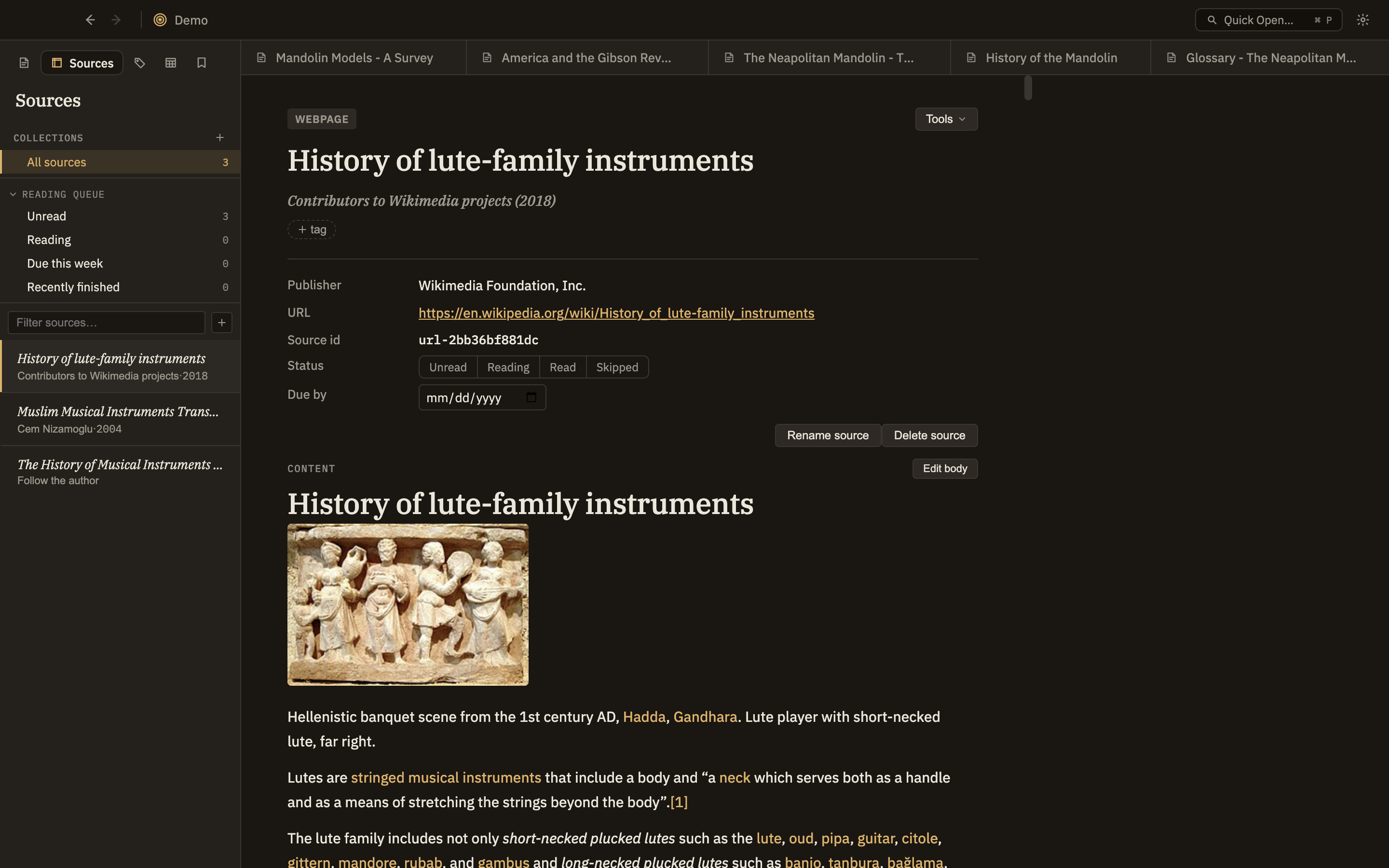
Minerva manages the sources behind your thinking — PDFs, web pages, papers, books — with real metadata and citations. The companion browser clipper saves what you're reading in one click, correctly, even behind a login.
Minerva Clipper— one-click web capture that grabs the rendered page and a canonical source ID; save a selection as a linked excerpt.
Import anything— PDFs (with OCR), DOI / ISBN / arXiv IDs, BibTeX, and Zotero RDF exports.
Real metadata— author, date, DOI, abstract, reading status, and collections — manual or auto-extracted.
Source viewer— read the source inline, anchor excerpts, and see every note that cites it.
Your notes are plain files on your disk. Voice, embeddings, and search all run on-device.
🧭
Semantic + full-text search
Fast full-text search plus on-device embeddings to find notes by meaning, not just keywords.
🔄
Live file sync
Notes are plain files — edit them anywhere. Minerva watches the folder and re-indexes changes the moment they hit disk.
⌨️
Keyboard-first
Every major action has a shortcut. A professional tool that stays out of your way — no hand-holding, no nag screens.
🎨
Themes
Dark, light, and high-contrast themes. Charts and diagrams re-skin live to match.
🪟
Split panes & windows
Open multiple thoughtbases in separate windows; split the editor and give each pane its own view mode.
Export & Publish
Take your thinking anywhere
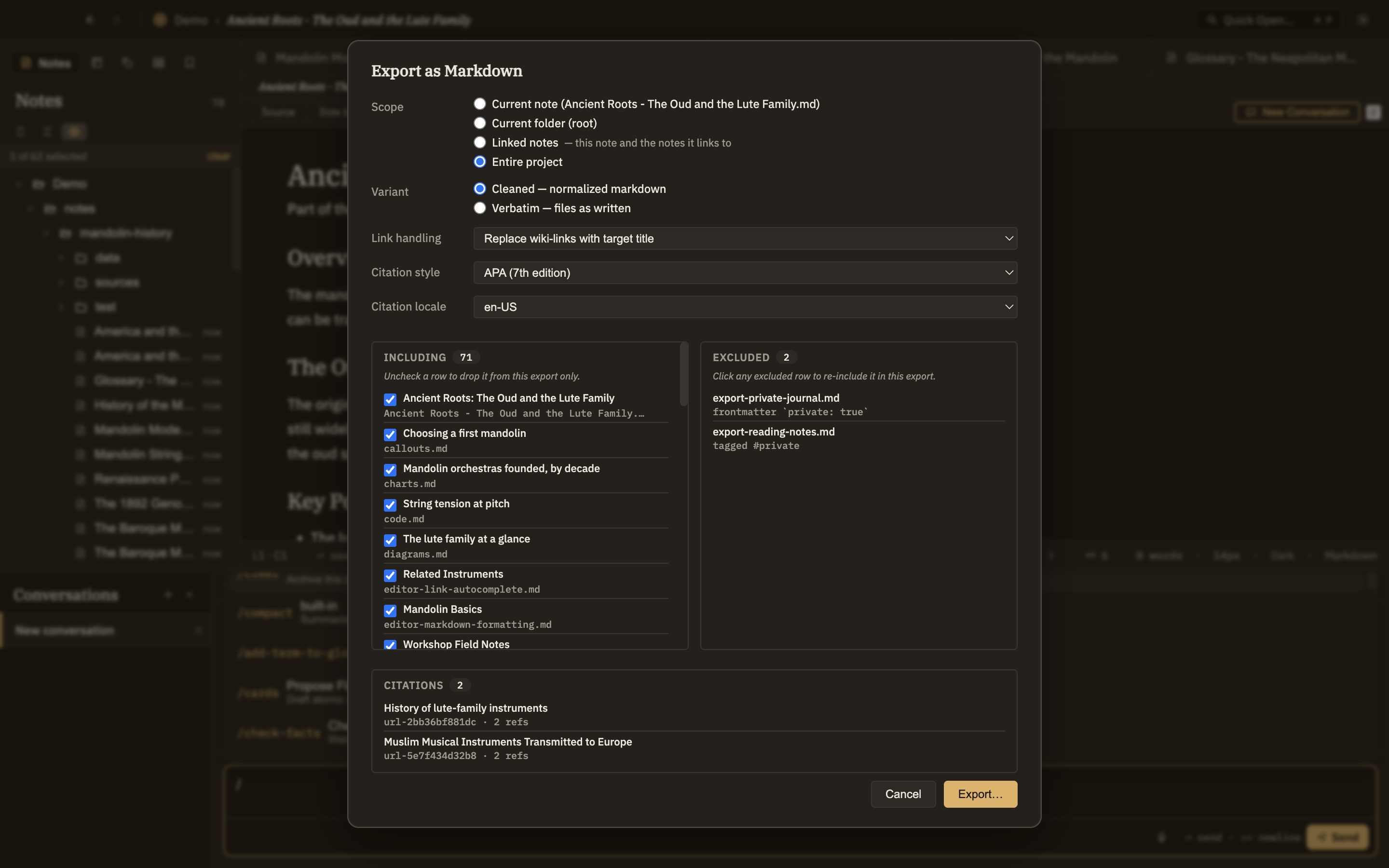
A thoughtbase isn't a silo. Export a single note or an entire folder tree to whatever form the moment calls for. Your thoughts are yours, fully exportable in standard formats. No lock-in. Ever.
Markdown · note & tree
HTML · note & tree
PDF · note & tree
Static Site · browsable
Anki Flashcard Decks · .apkg flashcards
BibTeX · bibliography
Pandoc · DOCX, EPUB & more
RDF / Turtle · your knowledge, portably
Export menu
Stop losing your best thinking.
The insights you get when working with AI are worth keeping. Give them somewhere to live — structured, sourced, and checkable — where you and the AI can keep building on it instead of starting every conversation over.